Showing posts with label PictureCorrect. Show all posts

Saturday, November 14, 2020

PictureCorrect: DSLR Photo Tip: What The Heck Is Back Button Focus?

Today’s DSLR photo tip continues with our series of tips covering functions on your camera that you’re most likely not using. Let’s talk about back button focusing.

Normally, to focus on a subject, we pick the focal point we want, then depress the shutter button halfway. This sets the auto focus (and the exposure, if you aren’t using manual mode). Then we recompose the shot so that the focal point is where we want it in the frame and depress the button the rest of the way to fire the shutter. Most of the time, this is OK. But in certain instances, it can be a real pain in the patootie!
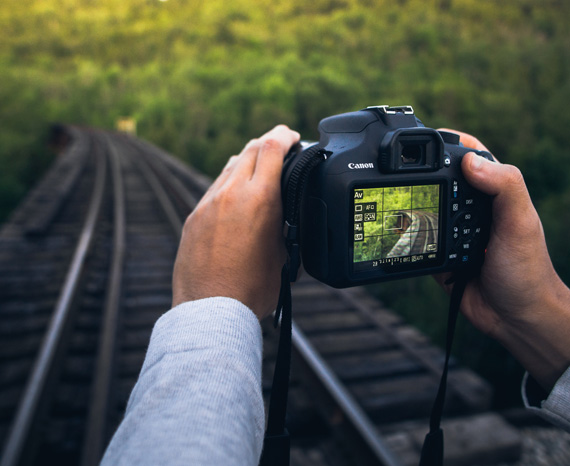
back button focus

Photo by Warren Wong; ISO 400, 1/60-second exposure.

Have you ever tried to photograph a scene in low light conditions? Often the lens can’t find the focal point and will keep moving back and forth trying to find something to focus on. By the time it actually does focus on something, the shot has long since passed. Not to mention that the final focus isn’t always where you want it to be.

Speaking of the final focus point not being where you want it to be…

I’m specifically thinking of a shoot where I was trying to get a portrait of a young girl with a bunch of tree branches and leaves framing her face and body. My lens kept focusing on the branches, and I had a heck of a time getting the girl in focus for each shot.
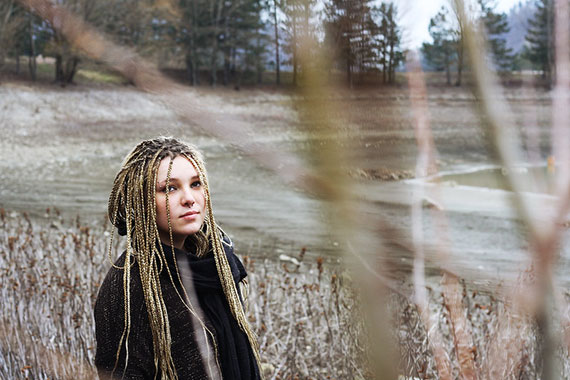
black button focus explained

Photo by Elisa Paolini; ISO 200, f/5.6, 1/100-second exposure.

Or, what if for some reason you want your photo to be out of focus? This is common in stock photos. The photo subject is out of focus and they later add in a sharp focus product image and sales copy.

Or what if you’ve got a moving target like a kid on a swing? You will want to focus on one spot and shoot every time the kid hits that location. If your lens refocuses every time, you are most likely going to miss the shot.

In the same vein, what if you are at a race of some sort. You’ve picked an ideal spot. The background is perfect, and as the bicyclers or cars or runners round a corner, the action is at its peak! To get the shot, you will want to focus on one spot and shoot as your subject gets there—and not have to refocus every time.

One way to handle the problem is to use manual focus. This requires that you turn the focus ring on the lens to manually set the focus. There is a danger here in that you may inadvertently change the exposure. (Don’t discount this, I’ve done it!)

But the biggest reason to avoid manual focus is that many of us don’t have the best eyes, and autofocus is just plain better. This is one of the few times I recommend an auto setting over manual.

A better way (than manual focus) is to use back button focusing.

What this does is remove the focusing function from the shutter button and move it to another button. Most DSLR cameras have added a button on the back of the camera for this function. (That’s why it is called back button focusing.)

In other words, once you set up your camera for back button focusing, when you depress the shutter half way, it doesn’t affect the focus. You can focus with the back button and the focus point will stay the same no matter how many shots you take and even if you change the exposure settings.
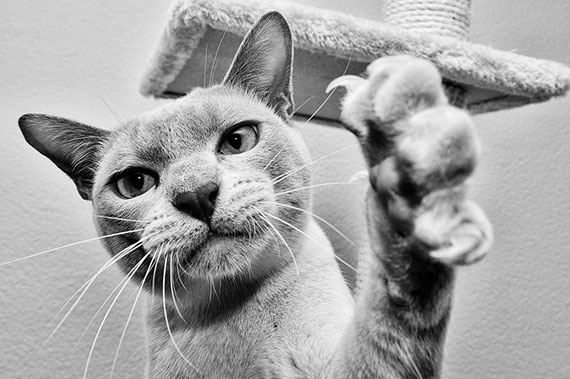
how to use black button focus

Photo by Tjarko Busink

Now, in that low light situation, you set the focus once and you don’t have to keep re-finding it. You can set your focus to have blurry shots if you want them, and pre-focusing on a certain spot is no problem.

3 Negative Aspects of Back Button Focusing

  1. If you’ve never used it before, it takes a bit of getting used to. But one or two sessions and it will be as second nature.
  2. If you let someone else use your camera, count on the fact that your shots will all be out of focus. They won’t know what to do.
  3. You will have to actually get out your camera’s manual to figure out how to set it to back button focus.

It seems that the menu settings are slightly different for all the various models of camera, so it would be a waste to try and describe the settings here. Sorry, but you are going to have to bite the bullet and actually read your manual.

Once you’re comfortable with back button focusing, you will most likely leave your camera on those settings, but it can easily be changed back and forth to fit the situation.

Practice changing the settings back and forth so you are comfortable with them and can select the way you want to focus on any particular session.

About the Author
Dan Eitreim writes for ontargetphototraining.com. He has been a professional photographer in Southern California for over 20 years. His philosophy is that learning photography is easy if you know a few tried and true strategies.


Go to full article: DSLR Photo Tip: What The Heck Is Back Button Focus?

What are your thoughts on this article? Join the discussion on Facebook

PictureCorrect subscribers can also learn more today with our #1 bestseller: The Photography Tutorial eBook

The post DSLR Photo Tip: What The Heck Is Back Button Focus? appeared first on PictureCorrect.


from PictureCorrect https://ift.tt/2O0uhg0
via IFTTT
PictureCorrect: Interesting Photo of the Day: Light-Painted Forest Octopus

The best thing about light painting is creative freedom. While we treat lack of light as a challenge in most genres of photography, that is totally not the case with light painting. Using your own source of light as a paintbrush, you gain the ability to paint whatever’s in your mind. You control what appears in the final image and are limited only by your own creativity. Take the following image by photographer Nikolay. The level of creativity is simply mind-blowing:

long exposure light painting

“Spooky Light Painting in the Woods” by Nikolay (Via Reddit. Click image to see full size.)

Nikolay shot the image on the Olympus OM-D EM1 with an 12-40mm f/2.8 Pro lens at f/3.2 and ISO 200 using the live composite mode. For the lighting, he used an LED flashlight and a double light blade.

While some can feel that the image is trippy with a psychedelic vibe, others feel it’s kind of spooky. It’s the look of an octopus in the middle of the woods that gives the eerie vibe to the image. It’s scary how it appears like the arms of an octopus emerging from the roots of the trees.

What do you see when you look at this image?


Go to full article: Interesting Photo of the Day: Light-Painted Forest Octopus

What are your thoughts on this article? Join the discussion on Facebook

PictureCorrect subscribers can also learn more today with our #1 bestseller: The Photography Tutorial eBook

The post Interesting Photo of the Day: Light-Painted Forest Octopus appeared first on PictureCorrect.


from PictureCorrect https://ift.tt/3kuK6uP
via IFTTT

PictureCorrect: Behind the Scenes of an Underwater & Astro Photoshoot

The world beneath the water’s surface is so amazing that you can rarely go wrong when capturing photos of it. Similarly, astrophotography is another genre that is not suited for everyone. However, in this genre of photography too, there’s a great potential to end up capturing images that are simply—and literally—out of this world. Let’s join photographer Pierre T. Lambert as he has his hands on with both of these fabulous genres of photography:

Lambert takes us through a spectacular behind the scenes journey of his beautiful trip underwater in a coral nursery. You can see in the video how he uses rolling waves, fantastic sunlight breaking into the water and beautiful corals to capture mindblowing images.

If underwater photography was not challenging enough during the daytime, Lambert also shows how he managed to take some more thought-provoking images during the night. The way he and his team work together is simply amazing.

Be sure to stick around until the end of the video. He also shares how he was able to photograph the Milky Way from the beach without a tripod. Can you believe that he shot those images at 1/5 seconds handheld and still managed to get some decent images? Kudos to his steady hands and the camera’s stabilization system!


Go to full article: Behind the Scenes of an Underwater & Astro Photoshoot

What are your thoughts on this article? Join the discussion on Facebook

PictureCorrect subscribers can also learn more today with our #1 bestseller: The Photography Tutorial eBook

The post Behind the Scenes of an Underwater & Astro Photoshoot appeared first on PictureCorrect.


from PictureCorrect https://ift.tt/3kwh8KU
via IFTTT

Friday, November 13, 2020

PictureCorrect: Insect Photography Tips

Why photograph insects?

insect photo tips

“Insect” captured by Paulo Brandao

Because:

  • 75% of living creatures on the planet fall into the insect category
  • They’re fascinating subjects with great natural beauty
  • The “ugh” factor the insects inspire in most people prevents us from having a close up look at the real thing.

Photographing insects is a specialized field and volumes have been written on the subject. However, there are four basics you need to know when you start and once you “whys” and “how to” of these, you’ll be ready to go deeper into special effects and also start experimenting on your own. Your camera manual and articles on macro photography will tell you all you need to know about macro lenses and close up filters, so we won’t go into all that here.

1. Sharpness

Sharpness is one of the most important facets of insect photography. We’ve all seen images of flies and other insects where the minute hairs on the body are visible. Without this effect, the whole impact of the image is lost. The easiest way to ensure sharp focus is to use the auto focus option on your camera. When doing macro photography, even the slightest bit of hand shake can change the depth of field and affect the sharpness of the image, so any shake after the auto focus is complete will affect the picture. Use the normal technique of half pressing the shutter button to start the auto focus and take the picture as soon as possible. To minimize handshake, use a minimum shutter speed of 1/125 of a second.

2. Lighting

Lighting is a common problem in insect photography. Of course you can use a flash, but the problem with using a flash with macro against brightly colored plant backgrounds, which happens in most insect photography, is that the natural colors are sometimes lost. With a 1/125 of a second shutter speed, an insect that is not well lit may cause the auto focus to fail. In that case, try manual focus, and if that still doesn’t look good, go in for the flash option.

insect on brown background

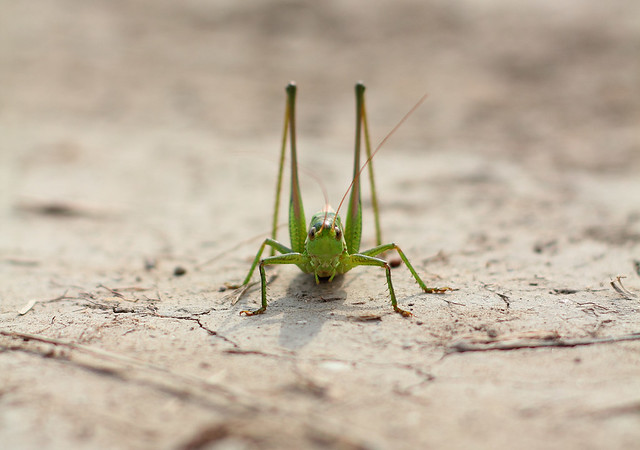
“Locust” captured by Rego Korosi

3. Background

Once you have your subject in proper focus, the next thing to do is look at the background. A blurred background will keep the attention on the insect. The easiest way to do this is to use the maximum possible zoom. A plus 10 macro lens at 84 mm focal length and a plus 4 lens at 210 mm will result in the same magnification but the latter option will produce a smooth, blurred background effect. Another thing to remember is that the greater the distance between the subject and the background, the more blurred the background becomes.

4. Framing

The final issue is framing. For the best effect, try to capture the insect from the front but at a slight angle. This will allow the head to be seen in relation to the body and keep the image in balance. With few exceptions, photos of an insect’s back are not of any great value. Keeping the insect slightly off center in the photo will yield positive results. Try using the “rule of thirds” for this.

dragonfly on flowers

“Om nom nom nom” captured by Erica Annie

Once you’re producing good results with these three techniques, you can start looking at experimenting on your own.

About the Author:
Peter Timko writes for Proud Photography, an online photography school.


Go to full article: Insect Photography Tips

What are your thoughts on this article? Join the discussion on Facebook

PictureCorrect subscribers can also learn more today with our #1 bestseller: The Photography Tutorial eBook

The post Insect Photography Tips appeared first on PictureCorrect.


from PictureCorrect https://ift.tt/2GY6rmI
via IFTTT

PictureCorrect: Interesting Photo of the Day: Milky Way from Santa Cruz

Due to the relative motion between the Earth and the core of the Milky Way, we cannot always get a perfect view of the majestic night sky. It’s between March to October that the core comes out prominently. This year, October’s new moon was one of the best times to catch a view of the magnificent beauty. And photographer Jake Messner was in no mood to let it pass without photographing it. So he headed out to explore some beaches near Santa Cruz, California, and was able to capture the following beauty:

milky way from Santa Cruz coast

“Milky Way from Santa Cruz Coast” by Jake Messner (Via Reddit. Click image to see full size.)

This is a nine-image panorama that he shot using a Sony A7III with a Sigma Art 50mm lens and a startracker. He shot 90-second exposures for each frame of the Milky Way at f/2.2 and ISO 500. And for the foreground, he shot a 20-second exposure at f/3.5 and ISO 100. Since he took the image right after twilight, we can see some illumination from the recently set sun on the landscape.

It’s fantastic how dense and bright the core appears to be in the image. Messner has done an absolutely great job in finding the right composition. It’s clever how he used the two rocky structures to frame the gigantic Milky Way core. Also, looking at the way the core seems to meet the Pacific far into the horizon, we can analyze the image in two ways: either the stars are being poured into the ocean, or being pulled out of it. Which would you like to believe?


Go to full article: Interesting Photo of the Day: Milky Way from Santa Cruz

What are your thoughts on this article? Join the discussion on Facebook

PictureCorrect subscribers can also learn more today with our #1 bestseller: The Photography Tutorial eBook

The post Interesting Photo of the Day: Milky Way from Santa Cruz appeared first on PictureCorrect.


from PictureCorrect https://ift.tt/35pZR1E
via IFTTT

PictureCorrect: Creative Tips on Using Fabrics for Studio Backgrounds

Backgrounds play a pivotal role in studio photography. They play a subtle yet very important role to help fill out evocative portraits. They complement the subject, adding a sense of depth and creating a certain mood. When selecting the background for your studio, using fabric can be a great idea. There is a variety of colors and patterns to choose from. However, making a fabric background that actually looks good is a bit tricky. In this video, photographer Gavin Hoey from Adorama shows how you can make a crease-free fabric background, and also shares ways you can create different backgrounds using the same fabric:

One major challenge you’ll face when using fabric for your studio background: creases. They may not appear when you look at the background straight, but they’ll surely be visible when the background is lit from the sides. In this context, Hoey shares a very handy tip: get yourself a fabric that’s a bit stretchy. This way, you can easily tackle the creases by stretching it using clamps, light stands and poles.

Hoey further demonstrates how the position of your lights affects the appearance of the fabric background. The closer the light is to the background—and the smaller the angle is between them—the greater are the chances that the imperfections will show up. So be very careful when setting up your lighting.

Toward the end of the video, Hoey also shares two great tips on how you can use the same fabric backdrop in other ways to achieve an entirely different look. Be sure to watch the complete video. We’re sure you’ll love it—especially if you’re setting up a small studio on a budget.


Go to full article: Creative Tips on Using Fabrics for Studio Backgrounds

What are your thoughts on this article? Join the discussion on Facebook

PictureCorrect subscribers can also learn more today with our #1 bestseller: The Photography Tutorial eBook

The post Creative Tips on Using Fabrics for Studio Backgrounds appeared first on PictureCorrect.


from PictureCorrect https://ift.tt/2JVFIs4
via IFTTT

Thursday, November 12, 2020

PictureCorrect: 10 Benefits of Photography to Mental Health

With the ongoing pandemic, communities are facing plenty of life-altering effects. While the immediate concerns are the physical effects of the virus and its complications, it also cannot be denied that there is a rapid increase of psychological distress occurring worldwide. Panic leads to the worst behavior and the most common mental health consequences arising from the outbreak include stress, anxiety, uncertainty, frustration, and depression.

mental health photo hobby

Through the years, thousands of studies have been made about different methods to care for persons who are suffering from different mental-health problems. Because of the current lockdown and imposed quarantine protocols, it is difficult for many individuals to have access to mental health practitioners and treatment options. So how does one cope with such a scenario?

The use of visual art has long been understood to have positive effects on both physical and psychological health. Photography is a form of self-expression that can contribute to a person’s ability to maintain or reconstruct a positive identity.

To further give you an idea about how photography can significantly benefit those who are facing mental health struggle especially during the pandemic, we have identified these benefits of photography in improving both physical and mental health:

1. Photography improves self-care habits

Dr. Liz Brewster of Lancaster University and Dr. Andrew Cox from the University of Sheffield made a study that revealed how taking pictures daily and sharing them with others can actually improve self-care. Doing something new develops into a new habit. The process is therapeutic and makes a person feel refreshed. It also keeps the brain busy by making it think for creative photos to take every day.

self care photography tips

Photo by Emma Simpson

2. Photography encourages community interaction

Making valuable connections significantly improves a person’s well-being. Taking pictures and sharing them to a community, like a social media group, can help you meet new people with the same interests. Photography becomes a common ground that can spark conversations, make connections and eventually find support to fight loneliness.

3. Photography can help you remember the joys of life

Photographs capture unique moments. The pictures that you take can help bring back memories from the past and all the positive thoughts that are with it. This is mainly the reason why most people who are feeling sad or depressed usually look through old pictures. It is an effective method to somehow lift up the mood.

healthy life outlook photography

Photo by Federico Respini

4. Photography provides a beautiful vision of the world

Every picture tells a different story. Taking pictures lets you see a unique beauty that you will only get to appreciate as you look through your camera. It allows you to discover your environment without even meaning to. The greatest thing about it is that photos let you freeze the beauty that you see as you take new photos of the world around you.

5. Photography keeps the brain in great shape

The brain also gets old and photography is a good exercise to keep the brain healthy. According to research by Professor Denise C. Park from the University of Texas, photography is a highly cognitive activity. In her study, participants who engaged in digital photography were able to enhance and improve their episodic memory and reasoning skills.

mental health techniques yoga photo

Photo by Wee Lee

6. Photography can help the body get moving

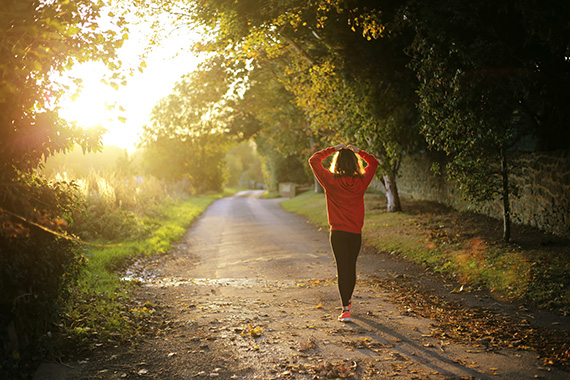
Outdoor photography pretty much requires people to go outside and walk around. This allows the body to burn more calories, especially if you need to climb a tree, crouch down toward a subject, jog ahead or partake in any other physical activity that keeps the body in motion. And if you don’t, even just lugging camera gear around can be great bonus exercise during a long walk.

7. You get to enjoy what you love even more

It is natural for a photographer to take photos of something that interests them. It becomes an enjoyable experience to see your interests in a different perspective. It also gives you a rewarding feeling that can boost your happiness more.

8. Photos are positive mood stimulants

According to a study titled The Connection Between Art, Healing, and Public Health: A Review of Current Literature, art therapy can help reduce cortisol, a hormone that can cause stress in the human body. Photography is a form of art, and taking a good picture can therefore make a person feel relaxed. Taking positive photos lets you see the world differently and will keep you motivated.

self care through photography

Photo by Thought Catalog

9. Photography improves creativity

Activating the brain through photography is possible because it does not only awaken creativity. It actually lets the brain process different thoughts and encourages the body to translate its emotions into photos. This activity also promotes curiosity and gives you the courage to try out different techniques to improve every shot.

10. Photography gives you a sense of direction

Especially with the pandemic, people are scared about the uncertainty of the coming days. Photography somehow eases you out of the daunting thoughts by making you look forward to what you will photograph next. Instead of brooding, taking photos lets you enjoy each moment, encouraging positivity and getting you excited for the next day that you will take new photos.

self-help photography tips

Photo by Dan Meyers

Additional Ideas: How to Take Photos and Be Creative During Quarantine

By picking up a camera, you instantly challenge yourself to get creative. Of course, social distancing protocols make this extra difficult. Because taking outdoor shots may be challenging for some, here are some practical tips for photographers that you can do to enjoy photography while in quarantine:

  1. Explore different methods of photo editing. For those working from home or taking online classes, you may have a bunch of time in your hands that you can use to learn about improving photos. You may enroll in online classes or explore any photo editing app that you currently have. This will allow you to revisit old photos and try to enhance them using what you have learned.
  2. Photograph food. There’s no better time to actually appreciate the chance to enjoy cooking and eating than being in quarantine. Get creative with your presentations and transform your meals into fine-art photos.
  3. Go black and white. One way to develop your photography skills is by shooting in black and white. Try it with your family or pet as the model and try to hone your skills with this technique.
  4. Take a photo scavenger hunt. This is a fun way challenge that you can do at home to help occupy your time. Make it a contest among your family and friends and create a social media group where you can upload and see each others’ shots.
  5. Get creative with a free background remover. Instead of brooding about not being able to get out, you can use a background remover to edit photos and bring the outdoors into the picture. Lighten the mood by editing yourself into travel destinations. Get a good laugh by having a virtual group picture with your friends and make it look real with a new background. There are tons of creative things you can do once you remove backgrounds from images.

Photography can help express yourself, but it has become a lot more valuable during this pandemic. It can help make a person focus on positive life experiences, reduce stressors and enhance self-worth. This is very important especially as the world has gone through too many changes in a matter of a few months since the outbreak started. It would somehow give the mind and body a sense of balance and makes it ready to face the day with positive thoughts and attitude.

About the Author:
Jenn Pereira is the product designer of Removal.AI, an AI technology used to remove background from images. This tool also comes with a free online photo editor that allows users to create diverting graphics, banners and images. She is passionate when it comes to designing and creating new ideas to help brands and small businesses realize and achieve their goals through innovative product, UI/UX design application and strategic digital marketing.


Go to full article: 10 Benefits of Photography to Mental Health

What are your thoughts on this article? Join the discussion on Facebook

PictureCorrect subscribers can also learn more today with our #1 bestseller: The Photography Tutorial eBook

The post 10 Benefits of Photography to Mental Health appeared first on PictureCorrect.


from PictureCorrect https://ift.tt/2Iu6pnh
via IFTTT

PictureCorrect: Interesting Photo of the Day: Golden Colorado Mountain Peak

You can’t go wrong when photographing mountain peaks during sunset. The greatest challenge is to know where to point your camera—let mother nature do the rest. But seriously, when the sun is that low, the light changes so rapidly that you can easily get caught off-guard, and you may end up losing the proverbial golden opportunity. That didn’t happen to photographer Remy Zanotto, who got the chance to photograph the Crested Butte mountain in Colorado during sunset and wound up with an absolutely breathtaking image:

Crested Butte during sunset

“Crested Butte During Magical Sunset” by Remy Zanotto (Via Reddit. Click image to see full size.)

Zanotto took the image on a Canon 6D Mark II with an 85 mm f/1.8 lens at f/1.8, 1/160 seconds and ISO 100. The most striking feature of this image has to be the fact how most of the elements fit in the orange monochromatic style. This gives a calm, soothing and vibrant look to the overall image.

Compositionally, too, Zanotto has done beautiful work with the photo. The landscape with the bushes and the beautiful autumn trees work as a foreground leading to the Crested Butte in the midground. Then there’s the magical sky with golden clouds hovering around the mountain that works as a compelling background.

The image is also a good example of why it can be a good idea sometimes to do away with the rule of thirds. Zanotto has done great justice to the majestic Crested Butte by placing it dead center. This way, the mountain gets the right amount of attention that it deserves.

Do you ever get tired of looking at sunset photographs?


Go to full article: Interesting Photo of the Day: Golden Colorado Mountain Peak

What are your thoughts on this article? Join the discussion on Facebook

PictureCorrect subscribers can also learn more today with our #1 bestseller: The Photography Tutorial eBook

The post Interesting Photo of the Day: Golden Colorado Mountain Peak appeared first on PictureCorrect.


from PictureCorrect https://ift.tt/38Hd0W6
via IFTTT

PictureCorrect: Don’t Forget Your Memory Card: A Photographer’s Nightmare

If you think about it, photography is not just about taking photos. It is a step-by-step process that requires a good deal of preparation. There’s always the chance something will go wrong, and in today’s video, photographer James Popsys shares his experience of how he came across his worst nightmare in a photography trip and how he got an opportunity to rectify if after three long years:

A Popsys shares in the video, he made the mistake of leaving his SD cards at home while he was out to photograph a Roman bridge in the middle of the woods. Just imagine how it’d feel when you’re amidst a beautiful location but you’re not able to take any photos.

“I don’t think I cried, but I certainly felt like it.”

When you think of it afterward, it might seem funny, but such mistakes can have serious repercussions. Imagine traveling to a remote location for a paid photography project just to realize that you’ve left your SD card or the battery at home. You’re lucky if you can find one and buy it near your location, but what if you can’t?

It’s natural to get excited for a new location. But don’t make the mistake of cutting any slack when it comes to preparation. Make a checklist and always double-check it. Carry some backup if you can, and don’t keep all of your eggs in the same basket. That way, if something breaks down or gets stolen, you’ll have the backup to get the job done.

What’s been your worst nightmare as a photographer? We’d love to hear about your experience. Feel free to share them in the comments.


Go to full article: Don’t Forget Your Memory Card: A Photographer’s Nightmare

What are your thoughts on this article? Join the discussion on Facebook

PictureCorrect subscribers can also learn more today with our #1 bestseller: The Photography Tutorial eBook

The post Don’t Forget Your Memory Card: A Photographer’s Nightmare appeared first on PictureCorrect.


from PictureCorrect https://ift.tt/35obk1T
via IFTTT

Wednesday, November 11, 2020

PictureCorrect: Don’t Be Afraid of High ISO on Modern DSLR Cameras

As the internet grows and grows, photography tutorials are becoming more and more abundant. All that information can be a good thing, but it can also create problems as it sometimes has the magical effect of turning one’s opinion to fact over time. Read around about digital photography and you will come across the ‘stock’ advice that some people give. Over time, this gets repeated until it becomes part of the conventional wisdom about photography.

dont-be-afraid-of-high-iso-1
One of these is in relation to ISO. The usual advice is to use the lowest ISO possible when you take a photo. There’s a good reason for this, as the image quality is always higher at lower ISOs than higher ones. But, what the authors don’t mention is that the quality at high ISOs on modern DSLR’s is now very good indeed.

dont-be-afraid-of-high-iso-2Given that high ISOs, especially if combined with prime lenses, enable you to take photos with a hand-held camera in low light conditions, when the quality of light can be amazing for subjects like portraiture, I think they are worth experimenting with. Embrace high ISO. Use it whenever the light is low. It depends on what camera you have, but you may be surprised how little noise there is at ISO settings like 1600, 3200, and 6400, especially if you follow the tips presented later on in this article.

ISO Improvements

There are several factors that make the high ISO settings more usable on recent digital cameras:

  • Sensor technology and noise reduction. For example, the latest cameras use processors that are faster and more powerful than previous versions, and one of the benefits of this is that it’s better at reducing noise when you use the JPEG format (if you use RAW, noise reduction is carried out by your RAW processing software instead).
  • Sensor size. If you have a full-frame camera it produces images with less noise at high ISOs than cameras with APS-C sensors. (All of the photos in this article were taken with a full-frame EOS 5D Mark II).
  • Better software. The noise reduction algorithms in the latest versions of Lightroom and Adobe Photoshop work amazingly well. As RAW processing software gets better over the years, so does its noise reduction function. (The photos in this article are processed with Lightroom.)

dont-be-afraid-of-high-iso-3

High ISO Techniques

There are a couple of things that you can do to help avoid excess noise at high ISOs. These apply no matter which ISO setting you are using, but the improvement in quality is more noticeable at high ISOs than low ones.

Expose to the right. This requires that you set an exposure that gives a histogram that leans all the way to the right without crossing the right hand side of the graph. In other words, there are no clipped highlights. This technique works well in low contrast conditions when the brightness range of the scene is less than the brightness range the camera’s sensor is capable of recording.

dont-be-afraid-of-high-iso-4

Aim for your photographs to be exposed more the right side of the histogram, trying to avoid clipping.

In the above example, I was able to increase the exposure by two stops over that recommended by the camera without clipping any highlights. This was made possible by the low contrast of the scene.

Post Processing

Take care in post-processing. If you lighten an area of your photo that is dark, you increase noise levels. The higher the ISO used, the more noticeable this is. If you have dark areas in your image, it’s best to leave them that way. Incidentally, you can make light areas darker without increasing noise, and this is one of the reasons that the expose to the right technique works.

dont-be-afraid-of-high-iso-5

Using Texture To Reduce Noise

Be aware that you will get noise in blue or black skies. Noise shows up most in areas without much texture, such as sky. It is also more pronounced in the blue channel. If you take a photo at high ISO and include blue sky or the night sky in the image, you will see a lot of noise in the sky. I don’t want to put you off taking photos that include sky (such as the one above) as you can create some beautiful images that way, but you should be aware that they will contain more noise than photos without sky.

dont-be-afraid-of-high-iso-6

Alternatively, if you take photos of something that contains a lot of texture, such as the books in the photo above, the texture has the effect of obscuring noise. Using the noise masking capabilities that texture has on an image can effectively boost the quality of your high ISO photography when it is taken into consideration during the composition phase.

dont-be-afraid-of-high-iso-7

Grain and digital noise can be used as a creative tool

A little critical thinking and you may be able to visualize new ways to frame your photograph so the texture is at its most beneficial position inside the image.

Use Noise Creatively

With early digital cameras noise was so pronounced, even at low ISOs, that most photographers wanted to reduce or eliminate it. But, now that high ISO performance has improved so dramatically, maybe it is time to start exploiting the aesthetic qualities of high ISO?

For example, photos taken at ISO 3200 and 6400 on my EOS 5D Mark II and processed in Lightroom, such as some of the images used in this article, have qualities similar to that of grain on fast films. Photographers like Sarah Moon and Robert Farber used high speed film and grain to create beautiful, evocative images in the seventies. Their subjects predominantly included portraits and the female nude. Maybe the day will come when a photographer makes their mark by using high ISO creatively the same way?

Get creative and start experimenting with whatever DSLR you have, you may discover new ways that you can use digital noise to add drama to and even enhance your photographs.

About the Author:
Andrew S Gibson is also the author of Understanding EOS: A Beginner’s Guide to Canon EOS Cameras, which takes a simple approach to using your DSLR by exploring only the controls that you need to learn (such as aperture priority) to create beautiful photos.


Go to full article: Don’t Be Afraid of High ISO on Modern DSLR Cameras

What are your thoughts on this article? Join the discussion on Facebook

PictureCorrect subscribers can also learn more today with our #1 bestseller: The Photography Tutorial eBook

The post Don’t Be Afraid of High ISO on Modern DSLR Cameras appeared first on PictureCorrect.


from PictureCorrect https://ift.tt/3phwvdT
via IFTTT